Dash Cam Mobile: Driver Record
CoolDev Co LtdAuto & Vehicles
4.03.00 Reviews
- Version
- 1.7
- Installs
- 10.00K
- Age Rating
- Everyone
Screenshots
Our Review of Dash Cam Mobile: Driver Record
 Analysis by Appyee
I tried Dash Cam Mobile: Driver Record with a simple goal: turn an Android phone into a practical driving recorder without carrying a separate dash camera. That starting point matters because this is not really an app you open for entertainment or casual browsing. It is a tool you prepare before a journey, leave working while you drive, and check later when you need a record of what happened.
In my experience, the app makes the most sense for drivers who already have a suitable phone and want a flexible way to capture road footage. Its Auto & Vehicles focus is clear, and the combination of video recording, GPS and speed tracking gives it more purpose than a camera app pointed through the windshield. The free download also makes it easy to test before deciding whether it fits your routine, although optional purchases range from $1.99 to $38.99 per item.
From parked phone to usable driving record
I’d start this section with the small setup choices that make a phone recording useful rather than merely available: a steady mount, a clear view through the windshield, and enough charge for the trip. Once those are in place, the next question is what kind of recording experience to expect from a phone doing sustained camera work.
What I would prepare before leaving
The first step is not pressing record. It is deciding where the phone will sit. A dash cam needs a stable, forward-facing position, and a loose phone can create shaky footage, block part of the view, or become a distraction. I would mount it before starting the engine, set the viewing angle while parked, and make sure the screen is readable without requiring attention once the car is moving.
This is also where a phone-based recorder differs from a dedicated dash camera. A dedicated unit is normally installed once and forgotten. With this app, the phone is still your everyday phone, so you need to think about mounting, charging and whether another person may need to use the device during the trip. That flexibility is useful, but it comes with a small routine that hardware owners may not have.
The app supports Android devices running version 7.0 or later, which gives it broad compatibility with older phones as well as newer models. Compatibility alone does not guarantee a good result, though. The camera, storage situation, battery condition and the quality of the mount will all influence how comfortable the setup is in real use.
Starting a trip and checking the basics
Before moving, I would open Dash Cam Mobile: Driver Record, frame the road and confirm that the phone is actually positioned to see the important area ahead. A wide-looking preview can be misleading if the dashboard, reflections or the mount cover part of the image. Taking a few seconds to inspect the view is more useful than assuming the default position will work.
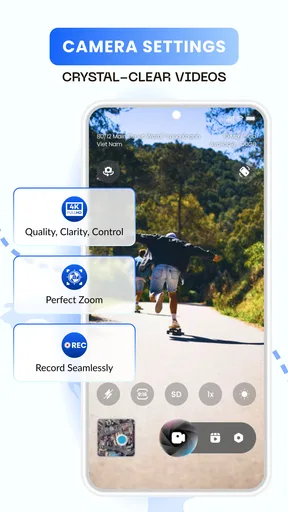
The central attraction is its ability to record in 4K dash cam quality. That gives the footage a strong level of detail when the phone and lighting conditions can support it. Still, 4K should not be treated as a guarantee that every license plate or distant object will be perfectly readable. Night driving, glare, rain, dirty glass and motion can reduce clarity even when the selected recording quality is high.
I would also avoid treating the phone screen as something to watch while driving. The practical workflow is to set everything while parked, begin the recording, and then leave the device alone. If the app requires frequent interaction during a journey, it becomes less suitable as a safety-focused recorder. The value comes from capturing the trip in the background of your attention, not from constantly checking the display.
How GPS and speed information change the footage
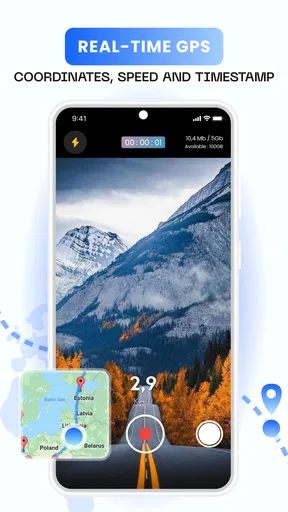
Video alone shows what the camera saw. The GPS and speed-tracking elements are intended to add context about where the vehicle was and how it was moving. That can make a clip easier to understand later, especially when reviewing a confusing incident or trying to remember the sequence of a longer drive.
There is a trade-off here. Location and speed details can make a recording more informative, but they can also make it more personal. If I shared a clip with someone else, I would first check whether it reveals a route, a regular destination or other information I would rather keep private. The sharing function is convenient, but convenience should not replace a quick privacy check.
Speed information should also be read as supporting context rather than an unquestionable legal measurement. A phone estimates movement through its available sensors and location information, and real-world conditions can affect accuracy. For ordinary trip review, that context may be useful. For disputes where every detail matters, I would not rely on a mobile app alone without checking the original footage and the surrounding circumstances.
The handoff from road to phone
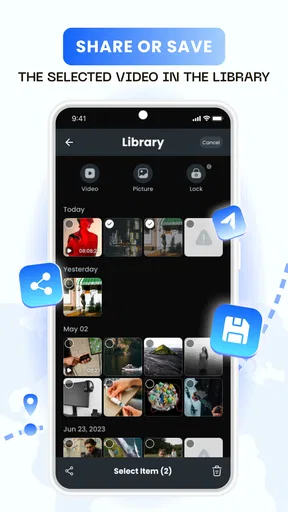
The most important handoff happens after the car is parked. The app turns a moving journey into a file or set of files that you may want to inspect, keep or share. I would review the clip before sending it anywhere, especially if the recording includes passengers, private conversations, home addresses or more of the route than the recipient needs to see.
Sharing with a smartphone is one of the app’s practical strengths. It avoids the extra step of removing a memory card from a dedicated camera and finding a separate reader. For a minor incident, a useful workflow would be to stop safely, park, open the relevant recording, check the beginning and end, and then share only after confirming that the clip represents the event clearly.
That last check is easy to skip when a driver is stressed. A recording may begin too late, end too early or show an angle that looked fine before the trip but is less useful in practice. I would not assume that the presence of a video automatically makes it a complete record. The outcome depends on how the phone was mounted and when recording started.
A realistic everyday scenario
Imagine a weekday drive through unfamiliar streets. I would mount the phone before leaving, start the app while parked and let it capture the route. Later, if another driver made an unexpected maneuver, I could return to the recording and use the road view together with the GPS and speed context to understand what happened.
If the clip needed to be sent to a family member, an insurer or another relevant person, I would first trim my own decision-making process around it: identify the exact moment, check whether the footage is stable, and make sure the shared copy does not expose unnecessary parts of the journey. The app helps with the capture and smartphone handoff; it does not remove the need for judgment after capture.
This workflow is also useful for reviewing driving habits. A driver could look at how often hard braking, confusing lane choices or rushed decisions appear during ordinary trips. The app is not a driving coach, but recorded footage can reveal details that are easy to forget once the journey is over. That is a more valuable use than simply collecting hours of road video without ever checking it.
Where the workflow becomes inconvenient
The phone itself is the main source of friction. Recording high-quality video can demand substantial storage, battery power and sustained camera use. I would begin a long trip with the phone charged and connected to suitable power, while remembering that a cable can interfere with the mount or controls if it is routed carelessly.
Heat is another practical concern for any phone used continuously behind a windshield. Direct sunlight and a warm vehicle can make the setup uncomfortable for the device, particularly when recording and location tracking are active together. I would avoid placing the phone where sunlight falls directly on it for hours, and I would stop the recording if the device becomes unusually hot rather than forcing it to continue.
Storage planning is just as important. A long sequence of high-quality recordings can fill available space faster than ordinary phone use. Before relying on the app for a trip, I would clear unnecessary files and decide how recordings will be moved or deleted afterward. Otherwise, the app may work correctly but leave no room for the next journey.
There is also a human limitation: a phone mounted for recording may be unavailable for navigation, calls or music controls. If you normally depend on that same device for directions, the dash cam role can compete with your other needs. A second phone can solve that problem, but then the setup becomes more expensive and less convenient than the free starting point suggests.
What the app is like as a product
CoolDev Co Ltd presents this as a focused driving recorder rather than a general camera utility. The current version is 1.7, and the app has reached over 10,000 installs with a 4.0 average from 73 ratings. That gives me the impression of a modest, usable tool with a real audience, but not one I would choose solely because of popularity.
The Everyone age rating makes the app approachable for a broad audience, although responsible use still matters because driving footage can contain identifiable people, locations and vehicle details. The free price is helpful for testing the workflow, while the presence of in-app purchases means I would check what each optional item changes before paying. A free installation is enough to decide whether the phone mounting and recording routine suits you.
One subtle advantage of this approach is adaptability. A dedicated dash camera is tied to one vehicle, while a phone can move between cars or be used for a rental vehicle. That is valuable for occasional drivers, travelers and people who do not want a permanent installation. The trade-off is that every vehicle change may require a fresh check of the angle, power connection and mounting stability.
Who should use it, and who should choose something else
I would recommend it to someone who wants an accessible backup recorder, already owns a reasonably capable Android phone, and is willing to prepare the device before driving. It is particularly sensible for occasional road trips, rental cars, temporary vehicle use and drivers who want GPS and speed context alongside the forward-facing video.
I would be more cautious about recommending it to a person who wants a completely automatic, always-ready system. If you expect recording to begin every time the vehicle starts, remain available without touching your phone, and continue without storage or heat management, a dedicated dash camera is probably the better choice. Hardware designed for that single job usually creates less daily friction.
It may also be the wrong option for drivers who need a second device for navigation or communication but do not have one. In that situation, the app can turn an otherwise useful phone into a competing piece of equipment. A dedicated camera paired with the normal navigation phone may produce a calmer and safer setup.
On the other hand, a regular camera app is a weaker alternative if you want more than an isolated video. The driving-focused workflow, GPS context, speed tracking and smartphone sharing give this app a clearer purpose than simply opening the camera and hoping the footage will be useful later.
My practical verdict after following the full workflow
Dash Cam Mobile: Driver Record is best understood as a flexible phone-based recorder, not a replacement for every dedicated dash camera. Its strongest result comes when the driver treats the process as a chain: stable mounting, careful framing, parked setup, uninterrupted recording, sensible storage management, and a deliberate review before sharing.
The 4K option is appealing, but I would judge the app by the complete outcome rather than the headline resolution. A stable phone with a clear windshield view and reliable power is more valuable than a high-quality setting used from a poor angle. GPS and speed details add useful context, yet they also make privacy and interpretation more important.
For me, the deciding question is whether you are comfortable making the phone part of the car’s equipment. If yes, this free Auto & Vehicles app offers a practical way to capture journeys and move clips directly through a smartphone. If you want a recorder that quietly lives in the vehicle and demands almost no preparation, spend your effort on a dedicated dash camera instead. The app works best when its flexibility is an advantage, not when you expect it to behave like permanently installed hardware.
Verdict
Strengths of Dash Cam Mobile: Driver Record
- Records driving routes with your phone’s camera and GPS.
- Automatic recording helps capture incidents without manual input.
- Useful trip history makes it easier to review previous journeys.
- Supports hands-free use, reducing the need to interact while driving.
- Can provide extra evidence after an accident or traffic dispute.
Limitations of Dash Cam Mobile: Driver Record
- Continuous recording can quickly consume storage space.
- Long drives may drain the phone battery without a car charger.
- Video quality depends heavily on the phone’s camera and lighting.
- Phone overheating may occur during extended recording sessions.
- Some features may require in-app purchases or premium access.
Other Releases by CoolDev Co Ltd
View All
CarLink - Car Play Connect
Auto & Vehicles4.5
Similar Picks in This Category
View All
Android Auto
Google LLC4.1

maxim — order a taxi & food
PT. SITO4.7

Штрафы ГИБДД: проверка с фото
Pays LLC – Штрафы ГИБДД4.7

Номерограм – проверка авто
Авто Ассист4.8

Дром Авто
Дром4.9

Frequently Asked Questions
What is Dash Cam Mobile: Driver Record used for?
Dash Cam Mobile: Driver Record turns your Android or iOS device into a basic driving camera. It can record the road ahead while you travel, helping you keep visual evidence of accidents, unusual traffic situations, or memorable journeys. Before using it, you should mount the phone securely, position it without blocking your view, and check local regulations regarding dashboard-camera recording and privacy.
Can Dash Cam Mobile: Driver Record record video while navigation is running?
The app is designed for in-car recording, and its usefulness depends on how it handles background operation, screen locking, and other apps on your particular device. In testing any dash-cam application, users should confirm whether navigation can remain visible or whether recording continues when another app is opened. Performance may also vary according to the phone model, operating-system version, and available storage.
Does the app work without an internet connection?
A dash-cam recorder generally needs access to the phone’s camera and storage rather than a constant internet connection, which makes offline driving possible in many situations. However, features such as maps, cloud backup, advertisements, updates, or location services may require connectivity. It is best to test recording in airplane mode before relying on the app during a trip, especially in areas with weak mobile coverage.
How much storage and battery power does Dash Cam Mobile: Driver Record use?
Continuous video recording can consume considerable battery power and storage, particularly when using high-resolution settings. Long journeys may create large files, so users should review the available space and understand how the app manages older recordings. Connecting the phone to a reliable car charger is strongly recommended, while lowering video quality or limiting recording length can help reduce heat, battery drain, and storage usage.
Is Dash Cam Mobile: Driver Record suitable as legal evidence?
The recordings may be useful as supporting material after a road incident, but the app cannot guarantee that a video will be accepted as official or decisive evidence. File quality, timestamps, GPS information, audio, and the way footage was preserved can all matter. Laws also differ between countries and regions, particularly concerning audio recording, number-plate capture, and filming other people, so users should check local requirements.
